Managing orders across fulfillment shouldn't mean hunting for information, back-and-forth emails with your 3PL and days of waiting - all while your customers wonder where their orders are.
This is what sets ecomflow apart.
While traditional fulfillment partners send weekly reports and keep brands waiting for updates, we're innovating the supply chain by providing real-time visibility and direct control over your fulfillment.
Our new Order Management system shows all orders at a glance, organized by fulfillment status, and automatically detects and groups issues in real time - so you can see exactly what needs attention and fix it instantly.
What’s new
Real-Time Status Dashboard
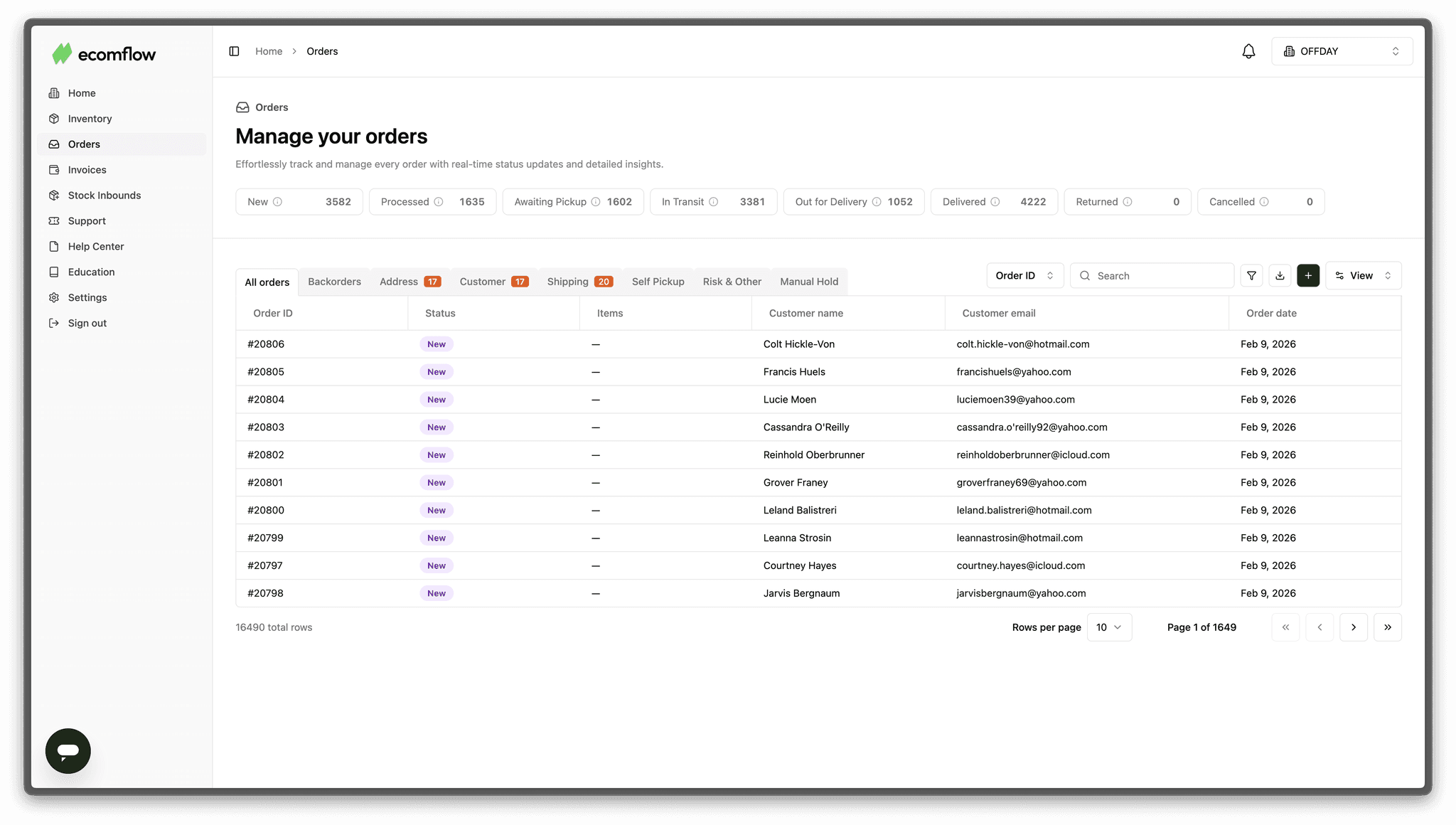
At the top of the Orders page, you see a complete real-time overview of your entire fulfillment operation with exact order counts for each status:
- New - Fresh orders just synced from your store
- Processed - Ready to ship
- Awaiting Pickup - Waiting for carrier collection
- In Transit - On the way to customers
- Out for Delivery - Final mile delivery
- Delivered - Successfully completed
- Returned - Coming back to the warehouse
- Cancelled - Cancelled orders
The numbers update in real-time as orders move through each stage, giving you instant visibility into your entire operation.
Automatic Issue Detection & Organization
Some orders can't ship because something is wrong - address typo, missing postcode, incorrect phone number, tax ID issues, remote area delivery problems, PO box restrictions, and more.
Our tech automatically scans every order, detects the specific issue, and organizes orders into dedicated tabs so you can see exactly what needs attention:
- Backorders* - Inventory not available
- Address - Incorrect address, missing postcode
- Customer - Tax ID issues, phone number problems
- Shipping - Remote area delivery, carrier restrictions
- Self Pickup - Customer needs to collect from service point
- Risk & Other - High-risk orders or unusual issues
- Manual Hold - Brand-paused fulfillment
Each tab shows you exactly how many orders need attention and what the problem is. Click into any order and you'll see a specific prompt like "Missing: Postal Code". From there, you can edit the information directly in the order and resolve any issues in no time, so your customers get their orders faster.
*Split Shipments & Backorder Flexibility
When orders contain multiple items and some are out of stock, you now have complete control over how to handle them.
You can see exactly which items are backordered, choose to ship available items immediately to keep customers happy and send the remaining items later when stock arrives. Or you can wait to ship everything together - it's your choice.
Try it today
Head to the Orders page in your dashboard and get instant access to the new Order Management system.